Cookie Banner for a Small Business Website: Fewer Trackers, Honest Buttons, No Slowdown
Many small business cookie banners ask about scripts that already loaded, hide Reject and slow the page. Cut trackers first, then build a banner that is fair and fast, and test it.
On this page
- Why your cookie banner exists at all
- Step 1: Make an inventory of what your site really loads
- Step 2: Decide, script by script, whether it needs consent
- Step 3: Pick the lightest setup that fits
- Step 4: Design a small business cookie banner that passes the rules
- Step 5: Make sure nothing loads before the click
- Step 6: Stop the banner slowing your site
- Step 7: Test it like a sceptical visitor
- What's changing in EU cookie rules
- What to do next
- Frequently asked questions
- Does a small business website need a cookie banner?
- Is "Reject all" required on the first screen of a cookie banner?
- Do privacy-friendly or cookieless analytics need consent?
- Will a cookie banner hurt my Core Web Vitals or SEO?
- Can I just use the default settings of a consent tool?
Jump to section
- Why your cookie banner exists at all
- Step 1: Make an inventory of what your site really loads
- Step 2: Decide, script by script, whether it needs consent
- Step 3: Pick the lightest setup that fits
- Step 4: Design a small business cookie banner that passes the rules
- Step 5: Make sure nothing loads before the click
- Step 6: Stop the banner slowing your site
- Step 7: Test it like a sceptical visitor
- What's changing in EU cookie rules
- What to do next
- Frequently asked questions
- Does a small business website need a cookie banner?
- Is "Reject all" required on the first screen of a cookie banner?
- Do privacy-friendly or cookieless analytics need consent?
- Will a cookie banner hurt my Core Web Vitals or SEO?
- Can I just use the default settings of a consent tool?
A lot of cookie banners on small business websites fail at all three of their jobs at once. They ask permission for scripts that already loaded. They bury Reject a screen or two deep. And on a phone they are often the jumpiest thing on the page. The owner rarely chose any of this: the banner came with a plugin or a "free" consent tool, and nobody looked at it again.
This guide is about getting a cookie banner for a small business website right: legally sound under EU rules, honest to the visitor, and light enough that it costs you no speed or enquiries. The short answer first, because it changes everything after it: the best cookie banner is the one you barely need. Every tracking script you remove is one fewer thing to ask about, explain, test and load. Many small business sites can shrink the banner to one honest question, and some can drop it entirely.
Below: how to decide what needs consent, what the banner must look like, how to keep it fast, and how to test that "Reject" really rejects. I rebuilt the consent setup on my own site this year, and I'll share what I found there.
Why your cookie banner exists at all
The rule behind the banner is older and narrower than most people think. It comes from Article 5(3) of the EU's ePrivacy Directive, which each country turned into its own law: in the Netherlands it is article 11.7a of the Telecommunicatiewet. The GDPR then covers what you do with any personal data you collect that way. The EDPB's cookie banner taskforce spelled out that split in 2023.
The rule covers far more than cookies: it applies to storing or reading information on the visitor's device. That covers cookies, local storage, tracking pixels and similar techniques. The European Data Protection Board's Guidelines 2/2023 explicitly cover URL and pixel tracking and tracking based on IP addresses. So "we don't use cookies" is not the end of the question if your site runs a pixel from an ad platform.
The useful consequence: the banner exists because of what your site loads. Change that and you change the banner.
Step 1: Make an inventory of what your site really loads
Before you touch the banner, find out what your site actually does today. The theme documentation and whatever your web designer set up three years ago are a starting point at best.
Open your homepage in a private window, open the developer tools (F12) and go to the Network tab. Reload without clicking the banner, then check two things:
- Requests to other domains. Anything not on your own domain is a third party: analytics, fonts, maps, videos, chat widgets, ad pixels, booking tools.
- Storage. Under Application (Chrome/Edge) or Storage (Firefox), check Cookies and Local Storage. Note each entry and who set it.
List each one: what it is, who runs it, why you have it. Expect surprises. On my own site, the redesign audit found conversion events being sent to Google tags that were never installed, while the analytics tool that was loaded was never called. What you think runs and what actually runs rarely match.
The usual suspects on a small business site:
- Google Analytics or Tag Manager, added "just in case" and never read.
- Meta Pixel or LinkedIn Insight Tag, left over from one campaign.
- Google Fonts loaded from Google's servers. A Munich court awarded a visitor €100 in damages in 2022 because a site sent his IP address to Google through embedded fonts. Self-hosting the fonts removes the issue.
- YouTube and Google Maps embeds, which load third-party code as soon as the page opens.
- Chat widgets, heatmaps and review badges.
Step 2: Decide, script by script, whether it needs consent
For each item, ask these questions in order. The second is the one most businesses skip.
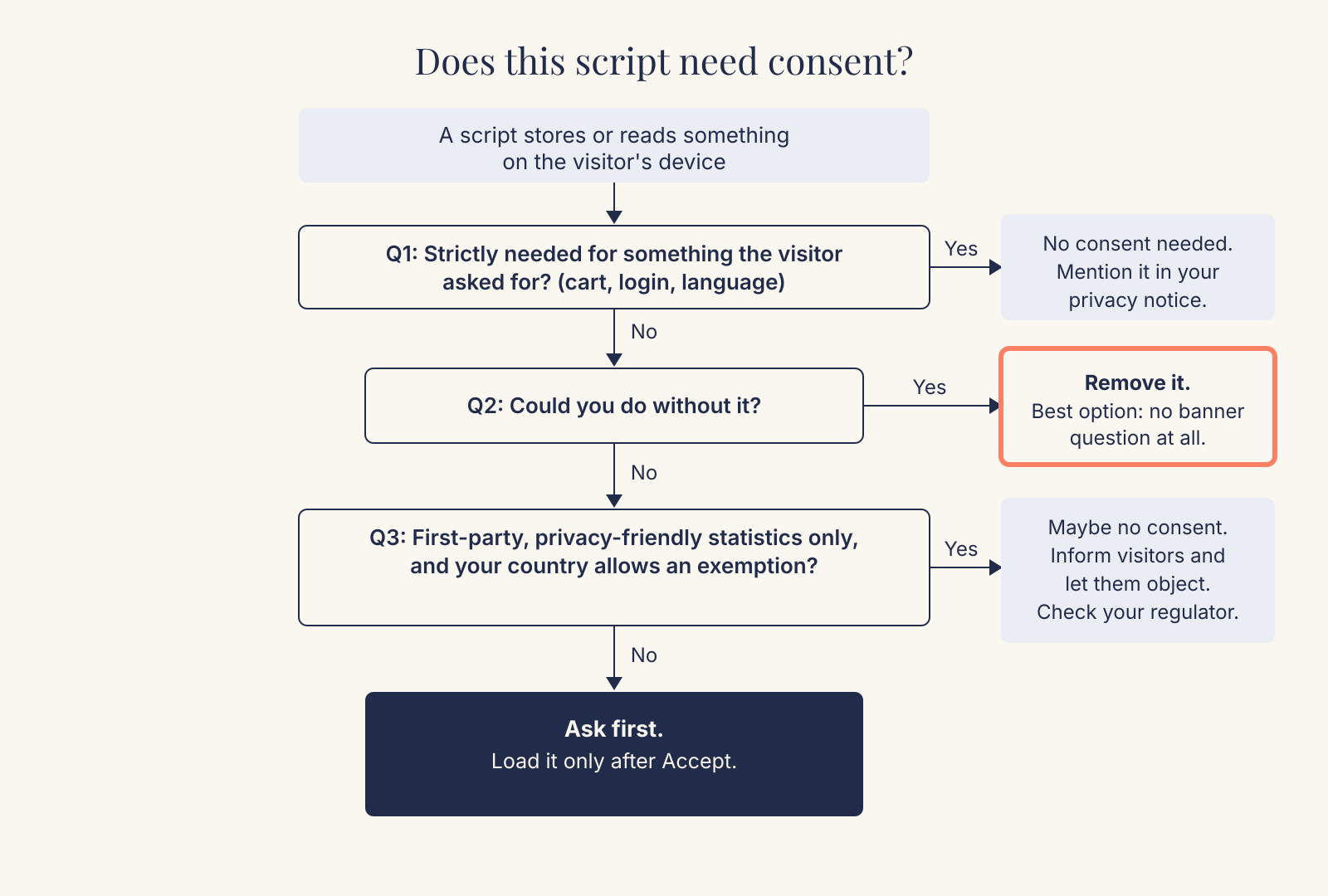
Is it strictly necessary for something the visitor asked for? A shopping cart, a login session, a language preference, a form's spam protection. These need no consent. The Dutch data protection authority (Autoriteit Persoonsgegevens, AP) says this plainly for functional cookies, though you still have to tell visitors about them, for example in your privacy statement.
Could you do without it? This question saves the most work. A pixel from a finished campaign can go. A YouTube embed can become a thumbnail that loads the video on click. A map can become a static image with a directions link. Each removal makes your site faster and your banner simpler.
Is it limited, first-party statistics, and does your country allow an exemption? National rules differ here. In the Netherlands, analytics cookies with no or minor privacy impact ("beperkt analytische cookies") don't need consent under article 11.7a. You still need a legal basis under the GDPR and a mention in your privacy statement, and the AP expects you to make objecting easy. France's CNIL has a similar exemption with strict conditions: including audience measurement only, no combining with other data, a truncated IP address and a 13-month maximum lifetime. It adds that most large analytics offerings don't qualify, whatever their settings. Other countries differ, so check your own regulator before relying on an exemption.
Everything else needs consent before it loads. Ad pixels, remarketing, most mainstream analytics in their default setup, and embeds that track. "Before it loads" is the part most often broken; see Step 5.
A note on "cookieless" analytics: such tools are lighter and more private, and many qualify for the exemptions above, but "cookieless" doesn't mean "no rules". I made my own site's privacy-friendly analytics load only after consent, and I count a browser's Do Not Track signal as a no. The cost is real: my statistics now cover only visitors who opt in, so the numbers are lower. I accepted that.
Step 3: Pick the lightest setup that fits
After the clean-up, most small business sites land in one of four situations:
| Your site after the clean-up | Banner needed? | What it costs you | Good fit for |
|---|---|---|---|
| Only strictly necessary storage (no analytics, or server-side logs only) | No banner. A clear privacy statement is enough. | You lose visitor statistics, or rely on server logs. | Brochure sites where enquiries are the only metric that matters |
| Necessary storage plus privacy-friendly first-party analytics that meets your country's exemption | Usually no consent banner, but you must inform visitors and offer an easy way to object | Some legal homework per country | Service businesses in NL or FR that want basic statistics |
| Necessary storage plus analytics that needs consent | A small banner with equal Accept and Reject; analytics loads only after Accept | Statistics cover only visitors who say yes | Sites that want detailed analytics without ads |
| Analytics plus ad pixels or remarketing | A full banner with clear purposes, named third parties, and per-purpose choices | Most work to build, test and maintain; heaviest on performance | Businesses that actively run paid campaigns and use the data |
Many small business sites sit in the fourth row without running any ads. If that's you, moving to row two or three is the biggest improvement you can make.
Step 4: Design a small business cookie banner that passes the rules
If you do need a banner, the design rules are clearer than most banners suggest. The Dutch AP publishes nine rules of thumb that line up closely with the European position. In practice:
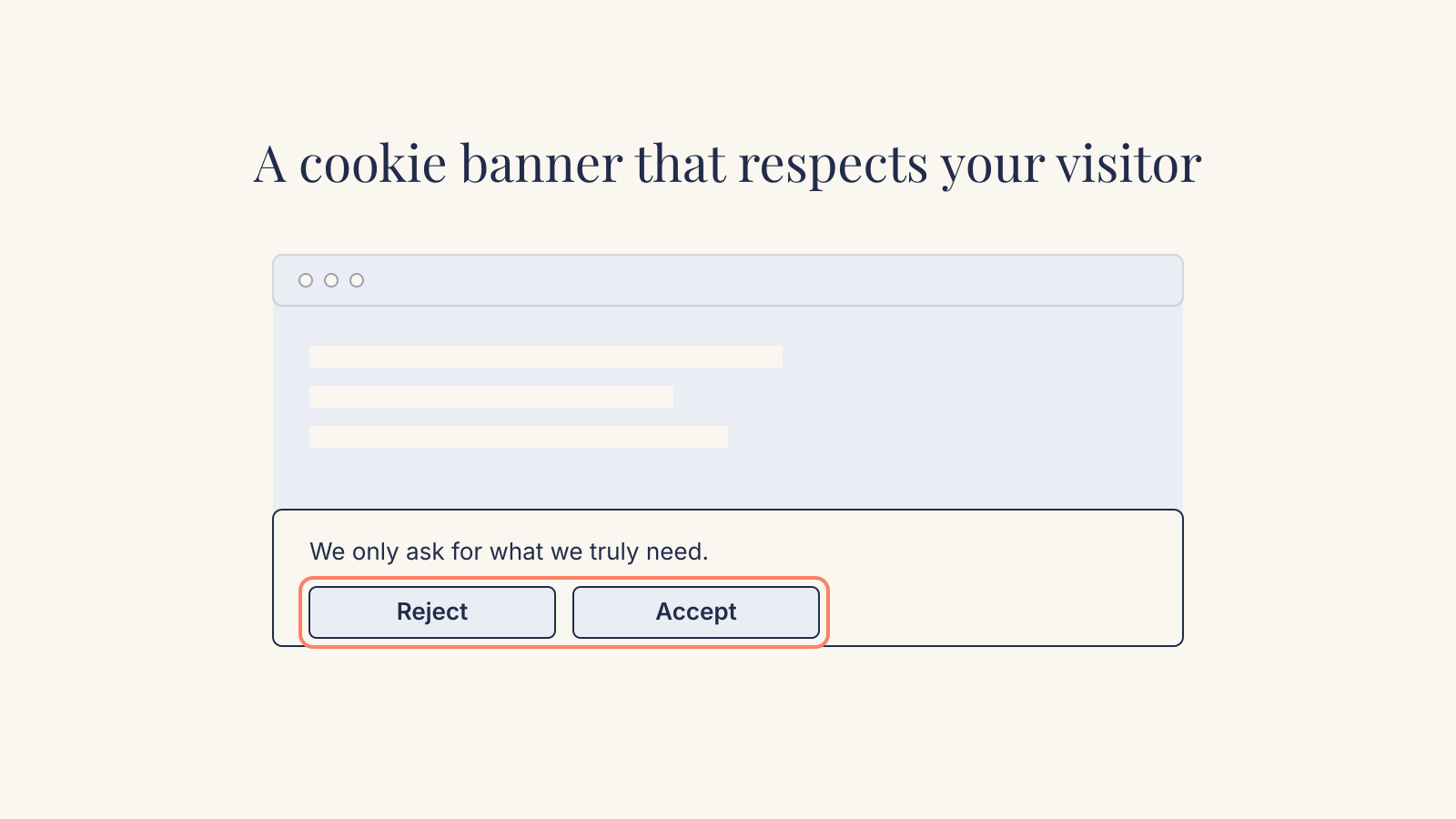
- Put Accept and Reject on the same layer. Refusing must take no more clicks than accepting; a "Settings" link instead of a reject button doesn't count.
- Give both buttons equal visual weight. The AP warns against a reject button that blends into the background or hides as a text link. The EDPB taskforce flagged deceptive colours and contrast too, and found that a majority of authorities expect a reject-all option on the first layer.
- No pre-ticked boxes or switches, on any layer.
- Say what you use and why, before the choice. Name purposes plainly, and say if you share data with third parties and how many.
- Make withdrawing consent as easy as giving it. A small persistent button or a link at the top of your cookie page works.
- Don't confuse consent with "legitimate interest". Tracking cookies need consent, and the AP says legitimate interest is no valid basis for personalised ads.
- No cookie walls. The AP is clear that visitors must be able to use your site normally if they refuse, and that scrolling on is not consent.
Two things about the words on the buttons, since language is home ground for me. First, label buttons with the action, in the same grammatical form: "Accept" and "Reject", or "Allow statistics" and "Refuse statistics". A pair like "Yes, great!" and "Manage preferences" is not a choice between two equal options. One is an answer and the other is a chore. Second, match the register of the rest of your site. A banner written in stiff legal language on a friendly local business site tells visitors that someone else wrote it, and boilerplate invites skimming.
If you use a consent tool, note the AP's warning: their default settings often don't comply, and the responsibility stays with you. Check the settings yourself.
Step 5: Make sure nothing loads before the click
This is where well-designed banners most often fail in practice. The banner looks perfect, but the scripts it is asking about have already loaded.
A recent study of 50 large websites visible from Poland, run in September 2026, makes the scale clear. On 24 of the 39 sites the author could measure reliably, traffic went to advertising or analytics companies before the visitor clicked anything. On 26 of 39, such traffic continued after a full refusal. The author is careful to note that a request alone doesn't prove personal data was processed. These were large, professionally run sites; a site built from a theme and three plugins is no safer by default.
The fix is simple to describe: scripts that need consent must not run until consent is given. In practice, one of these:
- The consent tool blocks them and injects them after Accept. Check that it really blocks: tools often only block scripts they recognise.
- Your developer marks the scripts inactive (for example
type="text/plain") and activates them after consent. - For Google's tags, use consent mode correctly. Google offers two versions. In basic consent mode, Google tags don't load until the visitor interacts with the banner, and no data goes to Google before that. In advanced mode, the tags load straight away with consent set to denied and send limited pings, which Google uses for modelling. For a small business, basic mode is the simpler one to defend and explain.
Embeds deserve their own fix. Replace YouTube and Maps embeds with a "click to load" placeholder: a static image and a short line such as "This video is hosted by YouTube. Loading it sends data to Google." The video loads only when the visitor clicks. This is better for privacy and faster, because the embed no longer pulls in third-party scripts before anyone presses play.
Step 6: Stop the banner slowing your site
A banner loads for every visitor. Google's web.dev guide on cookie notice performance lists how it can affect each of the Core Web Vitals:
- Layout shift (CLS): banners are a very common source of layout shift, especially banners that appear at the top and push the page down. Use a bottom bar or an overlay that sits on top of the page, so nothing moves when it appears. Be careful with slide-in animations.
- Responsiveness (INP): the Accept button is often the slowest interaction on the page, because clicking it starts a pile of third-party scripts at once. Fewer scripts behind the button means a faster click. This is one more reason the inventory in Step 1 pays off.
- Largest Contentful Paint (LCP): on mobile, a banner with a large block of text can itself become the largest element on screen, so your LCP is measured on the banner instead of your page. Keep the text short.
The same guide advises loading the banner script with async, placing it directly in the HTML instead of injecting it through a tag manager, and using preconnect if it's hosted elsewhere. It also notes that a self-built banner typically costs less performance than a third-party one.
A rule from my own site's redesign applies too: nothing on the first screen may wait for JavaScript. I made the hero and pricing content render on the server and show without scripts. Your headline, offer and contact button should be readable while the banner is still loading, and if the visitor ignores it.
One measurement trap: Lighthouse and similar tools test a first-time visitor who hasn't answered the banner, so they never show what happens after Accept, when the heavy scripts arrive. Test both states.
Step 7: Test it like a sceptical visitor
You need a private browser window and fifteen minutes.
- Before any click: load the page with the Network tab open. Only strictly necessary requests and storage should appear.
- Click Reject: browse two or three pages. Nothing from analytics or ad domains should appear.
- Clear everything, click Accept: now the consented scripts should load, and only those.
- Withdraw consent using your persistent button or link. Check that the scripts stop on the next page load.
- On a phone: check that the banner doesn't cover your main call to action, that both buttons are easy to tap, and that the page doesn't jump when it appears.
- Check your analytics dashboard in a normal browser. This comes from my own mistake. I tested my site's analytics with an automated script, got an "accepted" response from every call and reported success. The dashboard showed nothing: the tool discards automated browser traffic as bots while still answering "accepted". Only a real visit in a real browser proves the setup works.
Repeat this after every new plugin, embed or marketing tool.
What's changing in EU cookie rules
The EU may simplify these rules. The European Commission proposed changes in its Digital Omnibus package in November 2025. On 21 October 2026 the Council of the EU agreed its negotiating position, which, according to UniConsent's summary, keeps consent as the default but adds a closed list of uses that wouldn't need it, including first-party audience measurement, and a single-click way to refuse. The European Parliament still has to adopt its own position before a final text is agreed.
So nothing changes yet, and the direction rewards the setup this guide recommends: a site with only necessary storage and modest first-party statistics is already close to where the rules seem to be heading.
What to do next
If you have an afternoon, do this in order:
- Run the inventory from Step 1 on your homepage and your contact page. Write down every third party and every stored item.
- Remove what you don't use. Old pixels, unused analytics, chat widgets nobody answers. Self-host your fonts. Turn video and map embeds into click-to-load placeholders.
- Decide which row of the table you're in. If it's row one or two, you may be able to retire the banner. Check your national regulator's guidance first.
- If you keep a banner, fix the buttons. Same layer, same size, same weight, clear words, an easy way back.
- Run the seven-step test, including the dashboard check in a real browser.
- Update your privacy statement so it lists what's left. When I did this on my own site, I found the privacy page was missing several processors, and I had to soften a claim on my homepage that wasn't true. Audit first, then write the claim.
If you'd rather have someone do this with you, it's part of how I build and rebuild small business websites: fewer scripts, an honest banner where one is needed, and a test you can repeat yourself. You can see what that costs on the pricing page. And if your site's real problem is that it doesn't bring in enquiries, start with testing the lead path first. A cleaner banner helps, but it won't fix a broken contact form.
This guide explains how the rules work in practice. It is not legal advice. For decisions with real legal risk, check your national data protection authority's guidance or ask a privacy lawyer.
Frequently asked questions
Does a small business website need a cookie banner?
Only if it stores or reads information on visitors' devices that isn't strictly necessary or covered by a national exemption. Many sites need one only because of tools they don't use. Remove those and the banner may shrink to one question or disappear.
Is "Reject all" required on the first screen of a cookie banner?
The Dutch AP says reject and accept must be on the same layer, with no extra clicks to refuse, and a majority of European authorities agree. Put Reject next to Accept, same size and weight.
Do privacy-friendly or cookieless analytics need consent?
It depends on the tool and your country. The rule covers anything stored or read on the device, not only cookies. The Netherlands and France exempt limited first-party statistics under conditions. If in doubt, load it only after consent.
Will a cookie banner hurt my Core Web Vitals or SEO?
It can: banners commonly cause layout shift, the Accept click is slow if it starts many scripts, and a wordy banner can become the largest element on mobile. Anchor it at the bottom, keep the text short, load it async, and keep fewer scripts behind Accept.
Can I just use the default settings of a consent tool?
Not safely. The Dutch AP notes that these defaults often don't comply and the responsibility stays with you. Check the buttons, the categories, and above all whether scripts are really blocked before consent.
Want this done for your business?
I set up practical AI, build websites that get found, and design brands that hold together. Fixed prices, written scope, one accountable person.
Fixed prices, excl. VAT · You own everything · Reply within 24 hours