Website Not Generating Leads? Test the Lead Path Before You Redesign
Your site looks good and gets visitors, but the contact form is quiet. Before you pay for a redesign or new copy, test the lead path: five checkpoints between a click and your inbox, and how to check each one yourself.
On this page
- Why "website not generating leads" is often a plumbing problem
- The lead path, in five checkpoints
- Checkpoint 1: can visitors see your offer before the scripts load?
- Checkpoint 2: does every button go somewhere that works?
- Checkpoint 3: does the form survive a real visitor?
- Test it on a phone, with your thumbs
- Submit it before the page has finished loading
- Checkpoint 4: does the message actually reach you?
- Checkpoint 5: would you know if it broke?
- Check that "Reject" means reject
- One more leak: prices and promises that disagree
- The lead path test, as a checklist
- What to do next
- Frequently asked questions
- Why do I have website traffic but no leads?
- Why are my contact form emails going to spam?
- How do I know if my contact form is working?
- How do I check if analytics is tracking form submissions?
- If you would rather not do this alone
Jump to section
- Why "website not generating leads" is often a plumbing problem
- The lead path, in five checkpoints
- Checkpoint 1: can visitors see your offer before the scripts load?
- Checkpoint 2: does every button go somewhere that works?
- Checkpoint 3: does the form survive a real visitor?
- Test it on a phone, with your thumbs
- Submit it before the page has finished loading
- Checkpoint 4: does the message actually reach you?
- Checkpoint 5: would you know if it broke?
- Check that "Reject" means reject
- One more leak: prices and promises that disagree
- The lead path test, as a checklist
- What to do next
- Frequently asked questions
- Why do I have website traffic but no leads?
- Why are my contact form emails going to spam?
- How do I know if my contact form is working?
- How do I check if analytics is tracking form submissions?
- If you would rather not do this alone
Your website has been live for a year. It looks good, people say it looks good, and the analytics show visitors every week. The contact form is quiet. When your website is not generating leads, most advice goes straight to messaging, calls to action and SEO. Those matter, yet they all assume the machinery works: the button opens something, the form sends, the email lands, and someone counts it. Before you pay for a redesign or new copy, spend an hour testing that machinery. I call it the lead path, and on my own site it was broken in three places I had never noticed.
Why "website not generating leads" is often a plumbing problem
The top-ranking articles on this question list the same causes: unclear message, weak calls to action, slow pages, wrong traffic, a clumsy contact process. All reasonable. Almost none ask the more basic question: if a visitor did everything right today, would you hear about it?
That question matters because a broken lead path fails silently. A visitor whose message vanishes does not ring you to report a bug. They assume you are busy and contact the next business on the list. From your side, a lost enquiry and a visitor who never came look identical: an empty inbox.
I learned this on my own site. My previous website produced zero inbound clients; the clients I had came through other channels. When I rebuilt it, I made measurement a requirement and audited the old setup first. The findings were humbling:
- "Book a free call" appeared on roughly fifteen buttons. The calendar behind them was an unwired placeholder.
- Conversion events went to Google tags that had never been installed, while the analytics tool that was installed was never called.
- The contact form could put a visitor's name, email address and message into the page URL if they submitted before the page had finished loading.
None of these produced an error I would ever see. The site looked finished. So this guide is a test to run, with a pass condition for each step.
The lead path, in five checkpoints
A lead path is every step between "a visitor decides to contact you" and "you know they did". For most small-business sites it has five checkpoints, and a failure at any one makes everything after it irrelevant.
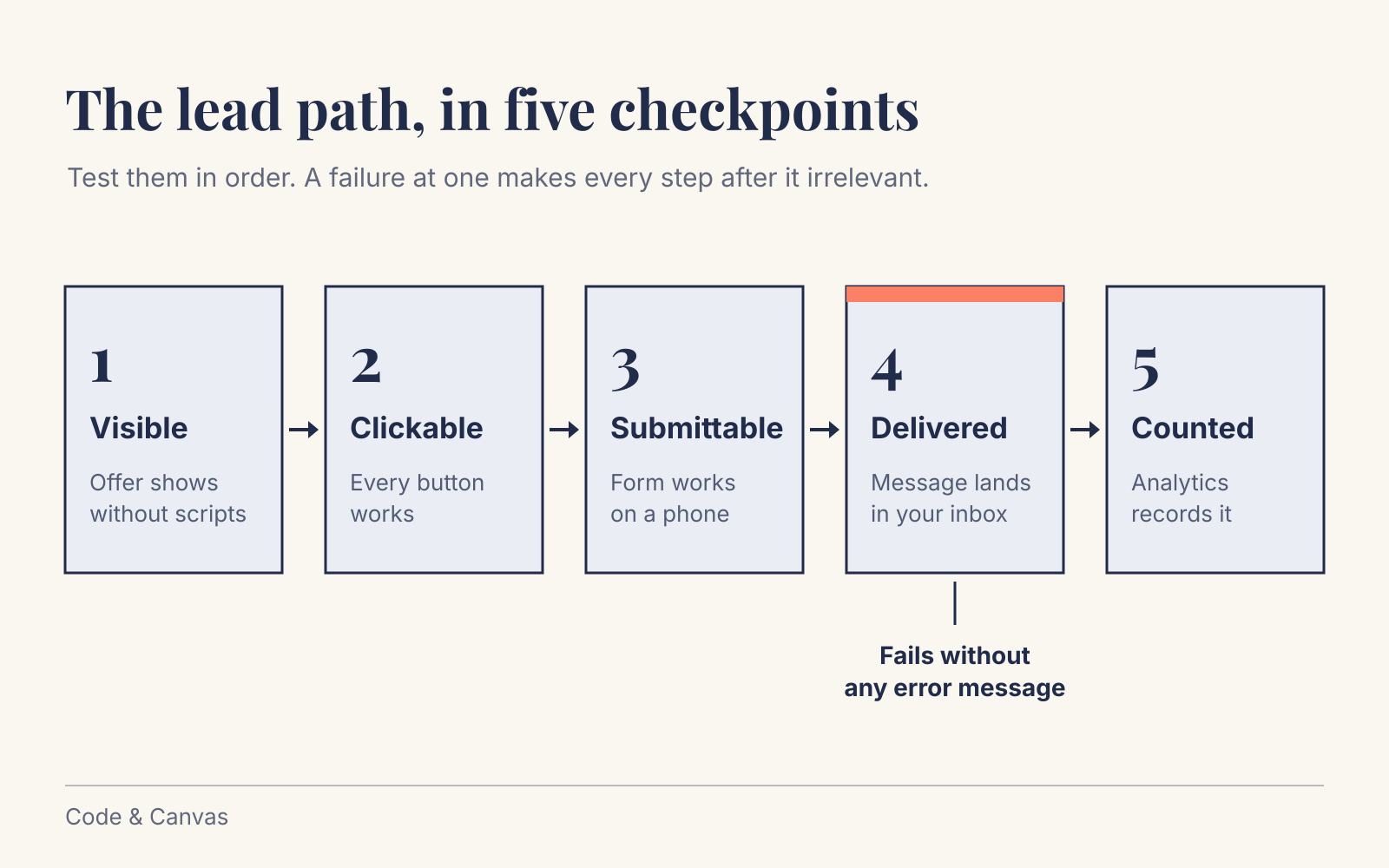
- Visible: the visitor can see what you offer, quickly, on their device.
- Clickable: every button and link that promises contact leads somewhere that works.
- Submittable: a real person on a real phone can complete and send the form.
- Delivered: the message reaches your inbox, and you keep a copy.
- Counted: your analytics records it, so you can tell a quiet month from a broken site.
Work through them in order. For each: what to test, how to test it without being a developer, and what a pass looks like.
Checkpoint 1: can visitors see your offer before the scripts load?
Many modern sites animate content into view: headlines that fade in, sections that slide up as you scroll. Those effects usually depend on JavaScript, which arrives after the page itself. On a fast laptop you never notice. On a mid-range phone on a train, the headline that explains what you do can stay invisible for seconds.
That happened on my own homepage: the hero headline and the pricing header were hidden until the scripts loaded. The rule I now apply to every site is that nothing on the first screen waits for JavaScript. I moved the entrance effects to plain CSS, rendered first-screen content on the server, and rejected a preloader as overkill. The homepage went from 53 interactive components to 31, and the content stays visible with JavaScript switched off. Images were the other culprit: converting the heaviest ones to WebP took one portfolio screenshot from 6.9 MB to 464 KB.
How to test it:
- Open your site on your phone, on mobile data, in a private window. Is your main message readable within a couple of seconds?
- Run your homepage and main service page through PageSpeed Insights and look at Largest Contentful Paint. Google's guidance is that it should happen within 2.5 seconds of the page starting to load.
- Ask whoever built your site: "Does anything on the first screen need JavaScript to become visible?" A clear "no" is a pass.
Small sites often have no field data from real visitors in PageSpeed, only a simulated lab score. Treat it as a rough guide; a perfect 100 is optional.
Checkpoint 2: does every button go somewhere that works?
It sounds too obvious to bother with, and it is the checkpoint I failed hardest. Sites grow by accretion: a booking widget for a campaign, a quote button copied from an old page, a WhatsApp link with an old number. Nobody checks them together.
How to test it:
- Open a spreadsheet. Go through every page and list everything that invites contact: buttons, phone and email links, booking buttons, chat widgets, the number in the footer.
- Click each one on your phone and your computer. Phone links should open the dialler with the right number. Email links should address an inbox someone reads. Booking buttons should show a real calendar with real free slots.
- Count the destinations. If fifteen buttons lead to four places (a form, a booking tool, an email address, an old landing page), you have four things that can break and four places to check.
My fix was blunt: every call to action on my site now points to one working booking link. Fewer routes in means fewer routes to break, and it makes Checkpoint 5 easier, because there is one thing to count.
Pass: every contact element leads to a working destination, and you can name every destination from memory.
Checkpoint 3: does the form survive a real visitor?
Owners test their forms once, on a desktop, on a fast connection, after the page has fully loaded. Visitors do none of those things reliably.
Test it on a phone, with your thumbs
Fill in your own form on your phone. Does the keyboard switch to the email layout for the email field and to numbers for the phone field? Can you see the field you are typing into? Make a deliberate mistake: does the error message say what is wrong and keep what you already typed? A form that wipes a half-written message because the phone number had a space in it loses that person for good.
Submit it before the page has finished loading
Almost nobody runs this test, and it is the one that caught my own form. Many forms are wired up by JavaScript. If a visitor taps "Send" before that script has loaded, the browser falls back to the plain HTML form. If that form has no method set, the default is GET, and with GET, as MDN explains, the form data is appended to the URL. On my site that meant a visitor's name, email and message could end up in the address bar and browser history, while the message itself went nowhere.
To test it: open the contact page on a throttled connection (Chrome's developer tools have a "Slow 4G" setting under Network), fill in the form fast and submit before the page settles. Then look at the address bar. If your own details appear after a question mark, you have this bug.
The fix takes a developer minutes: the form submits by POST, and the send button stays disabled until the form is ready. I also added a build check that fails if either rule is broken, so a later change cannot quietly undo it.
Checkpoint 4: does the message actually reach you?
When a contact form is not working, the form itself is often fine. The weak point is the notification email it sends you. The form shows the visitor a friendly "Thanks, we'll be in touch", and the email then lands in spam or is rejected by the receiving server. Nobody sees an error.
Gmail's sender guidelines require every sender, however small, to set up SPF or DKIM authentication for their sending domain, and Google recommends SPF, DKIM and DMARC together. Unauthenticated messages may be marked as spam or rejected. Website forms trip over this in two classic ways:
- The site sends mail through the web server's default mail function, from a domain whose SPF and DKIM records do not cover that server. To Gmail, that is an unknown machine claiming to be you.
- The form puts the visitor's address in the From field, so the email claims to come from someone@gmail.com while leaving your web server. That is exactly the impersonation authentication exists to catch: Google's guidelines say the From domain must align with the SPF or DKIM domain to pass DMARC.
The fix is the same for both: send notifications from an address on your own domain (for example website@yourbusiness.nl) through an email service set up with SPF and DKIM, and put the visitor's address in Reply-To so you can still just hit reply. Your developer or email provider can check the DNS records in a few minutes.
Keep a copy that does not depend on email. Email delivers; it is a poor place to store the only record of a lead. On my own site every enquiry is also written to my own database, and the database write and the email relay run in parallel, so if one fails the lead is still kept. If your site runs on a website builder or a form service, check whether it stores submissions in a dashboard, and make looking there a habit.
How to test it: submit your form from a Gmail address and from an Outlook address. Both notifications should reach your inbox within a few minutes, replying should go to the visitor, and the submission should also appear wherever your site stores it. Repeat after every change to hosting, domain or email provider, because DNS changes are where these setups usually break.
Checkpoint 5: would you know if it broke?
The first four checkpoints make sure a lead can reach you. This one makes sure you can see whether leads are reaching you, which is the only way to tell "a quiet month" from "the form has been broken since March".
On my old site, conversion tracking pointed at Google tags that did not exist. The dashboard showed nothing, and nothing looked wrong, because nothing is what you expect when nobody enquires.
How to test it:
- Submit the form yourself, then open your analytics in real time. In Google Analytics 4 that is the Realtime report, which shows the last 30 minutes. Your submission should appear as the event you named, such as "generate_lead". Most privacy-friendly tools have a similar live view.
- Test by hand, in a normal browser. I once ran an automated script against my own analytics, got an "accepted" response for every event and reported success. The dashboard was empty: the tool discards traffic from automated browsers as bots while still answering "accepted". The only proof is the event in the dashboard.
Check that "Reject" means reject
While you are there, check your cookie banner. My own privacy-friendly analytics was still loading for visitors who had clicked "Reject". In the Netherlands, the consumer authority ACM states that tracking cookies and privacy-sensitive analytics may only be placed with consent, and that visitors must be allowed to choose. My analytics now loads only after consent, and Do Not Track counts as a no.
The consequence: your numbers drop, because you only count people who opt in. I accepted that. The number you most need is the count of enquiries, and you can count those in your inbox without any tracking.
Pass: a test submission shows up as a named event within minutes, and a visitor who clicks "Reject" loads no analytics. You can check the second in your browser's developer tools (Network tab), or ask your developer to show you.
One more leak: prices and promises that disagree
This leak sits earlier in the path: it stops people from writing at all. If your prices or package names appear in more than one place, one of them is probably wrong right now.
On my own site, prices were restated across twelve files. When I moved every price into one place and added an automatic check that prices in the page's structured data (the markup search engines read) also appear in the visible text, it immediately caught two prices that had drifted, then three pages advertising offers they never described. Google's structured data guidelines say not to mark up content that is invisible to readers, so a mismatch is a search problem as well as a trust problem.
How to test it: put every price and package name from your site, brochures and social profiles side by side. A visitor who sees two different prices for one offer does not write to ask which is right.
The lead path test, as a checklist
Block an hour, take your phone and a laptop, and write down what fails. You will want that list when you talk to whoever maintains your site.
| Checkpoint | Test | Pass looks like |
|---|---|---|
| 1. Visible | Open the site on your phone, on mobile data, in a private window. Check Largest Contentful Paint in PageSpeed Insights. | Main message readable within a couple of seconds; LCP at or near 2.5 s. |
| 2. Clickable | List and click every contact button, phone link, email link and booking widget. | Every one reaches a working destination you can name. |
| 3. Submittable | Fill in the form on a phone, make a deliberate mistake, submit on a throttled connection before the page settles. | Right keyboards, clear errors that keep your text, no personal data in the URL. |
| 4. Delivered | Submit from a Gmail and an Outlook address. | Both reach the inbox within minutes; reply goes to the visitor; a stored copy exists. |
| 5. Counted | Submit once and watch real-time analytics. Click "Reject" and check the Network tab. | The lead event appears; nothing loads after "Reject". |
| Bonus: consistent | Put every price and package name side by side. | One price per offer, everywhere. |
What to do next
Run the test now, then on a schedule. Once in full, then a five-minute delivery test monthly, and the full test after any change to the site, plugins, hosting, domain or email provider. Lead paths rarely break on launch day. They break when something next to them changes.
Fix in this order: delivery, buttons, form, measurement, speed. A lost message is a lost customer; a slow headline is a weaker first impression. If Checkpoint 4 fails, fix it before anything else.
Make the fixes stick. Ask for checks that run automatically: a build check that the form submits by POST, an alert when no enquiry has arrived for longer than usual, one file for prices. A fix that depends on someone remembering will be undone by the next well-meaning change.
Then work on the message. Once the lead path works and is measured, the usual advice about headlines, calls to action and SEO becomes testable, because you can see whether a change made a difference. If you sell to larger companies, the credibility side is covered in why your startup website is losing deals. If the test makes you want to rebuild everything, read how to choose a frontend framework without becoming a developer first; most lead-path failures can be fixed without a rebuild.
A caveat: a working lead path does not create demand. On my rebuilt site I verified the booking and tracking end to end with a test submission; whether it brings consistent inbound clients is something I am measuring now and cannot report yet. What the test guarantees is narrower and more useful: when someone does want to hire you, you will hear about it, and you will know how many did.
Frequently asked questions
Why do I have website traffic but no leads?
Three broad causes: visitors who were never going to buy, a message that does not convince the right visitors, or a lead path that fails mechanically. Rule out the third first. It is the cheapest to test, and if a test enquiry does not reach you, real ones do not either.
Why are my contact form emails going to spam?
Usually because the notification is not authenticated for your domain: Gmail requires SPF or DKIM from all senders. Send from an address on your own domain through an authenticated email service, with the visitor in Reply-To.
How do I know if my contact form is working?
Submit it on a phone from two email providers, such as Gmail and Outlook, and check that both notifications reach your inbox within minutes and that replies reach the sender. Check that the submission is also stored outside your email. Repeat monthly and after any hosting, domain or email change.
How do I check if analytics is tracking form submissions?
Submit the form in a normal browser and open the real-time view (the Realtime report in Google Analytics 4). It should appear as a named event within minutes. Automated test scripts can be silently filtered out as bots.
If you would rather not do this alone
You can run the lead path test yourself in an hour, and I would encourage you to. If you find failures and want them fixed properly, with checks that stop them coming back, that is the kind of work I do for small businesses. See how I approach web design and development and what it costs on the pricing page, or book a call through the one button on my site that I now know works.
Want this done for your business?
I set up practical AI, build websites that get found, and design brands that hold together. Fixed prices, written scope, one accountable person.
Fixed prices, excl. VAT · You own everything · Reply within 24 hours