AI Invoice Data Extraction: Where the Model Should Stop
AI reads invoices well, but it can't tell you which values it got wrong. Here's how to let checks, not the model, decide what goes into your books, with test results from my own invoice tool and a step-by-step setup.
On this page
- What AI invoice data extraction gets right, and the accuracy problem
- What I found when I tested it on my own laptop
- The rule: the model proposes, the checks decide
- 1. Arithmetic
- 2. Checksums and formats
- 3. Grounding: every value must be printed on the page
- 4. Two independent readers must agree
- 5. Enforce the format in structure, not in the prompt
- The review folder is the product
- Before you build anything: is the invoice already data?
- Cloud, local or no model at all?
- How to set up AI invoice extraction for a small business
- What to do this week
- FAQ
- Can ChatGPT extract data from invoices accurately?
- What accuracy should I expect from AI invoice extraction?
- Is OCR or an LLM better for invoice processing?
- Do I still need AI if my suppliers send e-invoices?
- Is it safe to send invoices to an AI tool under the GDPR?
Jump to section
- What AI invoice data extraction gets right, and the accuracy problem
- What I found when I tested it on my own laptop
- The rule: the model proposes, the checks decide
- 1. Arithmetic
- 2. Checksums and formats
- 3. Grounding: every value must be printed on the page
- 4. Two independent readers must agree
- 5. Enforce the format in structure, not in the prompt
- The review folder is the product
- Before you build anything: is the invoice already data?
- Cloud, local or no model at all?
- How to set up AI invoice extraction for a small business
- What to do this week
- FAQ
- Can ChatGPT extract data from invoices accurately?
- What accuracy should I expect from AI invoice extraction?
- Is OCR or an LLM better for invoice processing?
- Do I still need AI if my suppliers send e-invoices?
- Is it safe to send invoices to an AI tool under the GDPR?
You drop twenty supplier invoices into an AI tool and get back a tidy spreadsheet. You spot-check five rows, they match, and you move on. Somewhere in the other fifteen, one total has lost a digit or a VAT amount belongs to a different line. Nothing about that row looks different from the correct ones. That is the real problem with AI invoice data extraction: the errors are rare, and they look exactly like the right answers.
Here is the short answer. AI is good at finding things on an invoice: which text is the supplier, which block is the line items, which label means "total" in German. It is not trustworthy as the final word on what a number is. A setup you can rely on lets the model propose values, lets plain checks (arithmetic, checksums, "is this value actually printed on the page?") decide what gets accepted, and sends everything that fails to a person instead of guessing.
Below: why, what I found testing it on my own laptop, and the checks and steps to use whether you buy a tool or build one.
What AI invoice data extraction gets right, and the accuracy problem
Current large models read invoices remarkably well. In a 2025 benchmark by researchers at Fraunhofer IAIS, eight models were tested on three public invoice and receipt datasets. Gemini 2.5 Pro scored 96.5% on clean invoices and 92.7% on scanned invoices, with GPT-5 Chat and GPT-5 Mini both above 96% on the clean set.
Now look at what 96.5% means in a bookkeeping context. Say you process 150 invoices a month and pull 15 fields from each: 2,250 values. At 96.5% field accuracy, roughly 80 of them are wrong every month. The accuracy figure tells you how many. It doesn't tell you which ones.
Three findings make this worse than it sounds:
- The hardest fields are the ones that matter. In the same benchmark, the IBAN field scored clearly worse than the others, with mistakes like reading a zero as the letter "O" or "U". An IBAN with one wrong character still looks like an IBAN.
- Valid output is not correct output. The Structured Output Benchmark (SOB), published in 2026, separates "the JSON parses" from "the values are right". Across 28 models, the parse rate sat near the ceiling while the best value accuracy was 82.0%, and the best rate of fully correct records was about 54%. SOB uses mixed documents, not only invoices, so read it as a pattern rather than an invoice score: the format can be perfect while a value inside it is invented.
- Small models fall off a cliff. The smallest model in the Fraunhofer test, Gemma 3 4B, scored 45.7% on clean invoices with direct image input. If your plan involves a small model on your own hardware for privacy reasons, that matters (more on that below).
One development studio that built both approaches lists LLM accuracy of 92-97% on known formats and a "low-moderate" hallucination risk, against "none" for classic OCR. A wrong value from OCR usually looks garbled. A wrong value from a language model looks plausible, because producing plausible text is what the model does.
What I found when I tested it on my own laptop
I've been building an invoice-to-CSV tool for my own use: PDF invoices in, a validated spreadsheet out, on an ordinary office laptop. It isn't published or tested on real invoices yet, and every number below comes from synthetic test invoices. But the design went through enough dead ends to be useful.
My hard requirement was "silent wrong values near zero". A missing value is annoying. A wrong value that nobody notices ends up in your VAT return.
The first version used a language model. I ran Ministral 3 8B (4-bit quantised) locally and constrained its output to a JSON schema. It took about 60 minutes to process 50 invoices and read the amounts right about 47% of the time. It also needed a 4 GB model file and a model server running in the background.
Smaller models did worse on numbers. I compared six approaches on 50 development invoices and 20 held-out ones, on a CPU-only Apple M2. A tiny model (LFM2.5-230M) got the subtotal and total right 4-10% of the time. The best performer, GLiNER2.5-multi, was a genuinely good reader of invoice headers at 0.22 seconds per invoice, but got only 15 of 20 supplier names right on layouts it hadn't seen.
I had to correct my own result once. An int8-compressed version of that model looked as accurate as the original. It turned out I had measured the uncompressed copy by mistake. Measured properly, it was slower and less accurate, so I dropped it. If a result looks too good, measure it again.
The version that worked uses no model for amounts. I replaced the language model with plain code that reads the PDF's text layer and a set of checks (described in the next section). It reads amounts exactly, at about 1 millisecond per invoice. On a fresh set of 800 generated invoices it accepted all 640 clean ones, sent all 160 deliberately broken ones to review, and let zero wrong values through silently. On 129 noisy German OCR texts it accepted none at all. That is the behaviour I want: it refuses what it can't read instead of guessing.
The cost is real: scans and unfamiliar layouts go to a person. A large cloud model would have scored far better than an 8B model on a laptop, as the benchmark figures above show. But even at 96%, you still need a way to find the 4%, and that way is the same set of checks.
The rule: the model proposes, the checks decide
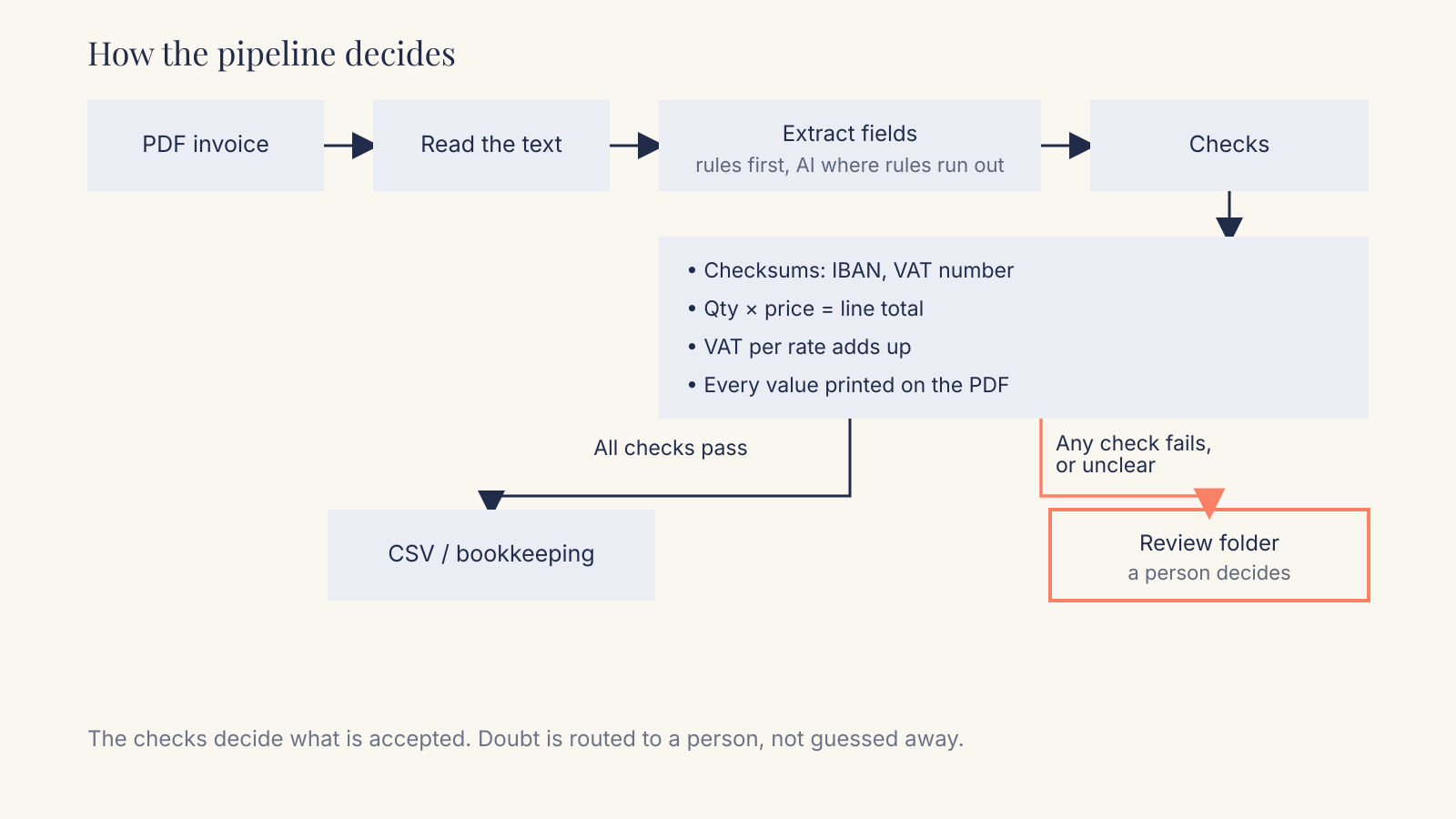
Invoices contain their own proof. The line amounts must add up to the subtotal, the VAT must match the rate, and identifiers like IBANs carry check digits. That means you can verify most of an extraction without knowing the right answer in advance. Here are the checks I use, in the order I'd add them.
1. Arithmetic
For every line: quantity times unit price equals the line amount. Then: the lines add up to the subtotal, the VAT per rate is correct (in the Netherlands mostly 21% and 9%), and subtotal plus VAT equals the total. Allow for rounding to the cent, nothing more.
This catches most transposed digits, dropped decimals and values from the wrong line, because a wrong number rarely keeps every sum intact.
2. Checksums and formats
An IBAN has two check digits, and the whole number must pass a MOD 97 calculation defined in ISO 13616. A single misread character almost always fails it. Dutch VAT numbers can be checked too: the elfproef for legal entities and a modulus-97 check for the btw-id that sole traders have used since 2020. Chamber of Commerce (KvK) numbers have a fixed format. None of these checks needs a model or an internet connection.
3. Grounding: every value must be printed on the page
This is the check most tools skip, and it's the one that catches hallucination. After extraction, search the invoice's text for each value. If the total says 1,482.50, the string "1.482,50" or "1,482.50" must actually appear on the PDF. A value that appears nowhere on the document was invented, however reasonable it looks, and it goes to review.
4. Two independent readers must agree
For fields where you do use AI, such as matching a printed label like "Rechnungsbetrag" or "Te betalen" to the field "total", one reader is not enough. In my own testing, no single reader reached zero wrong answers at useful coverage. Requiring two independent readers to agree gave 64 right and 0 wrong, at 51% coverage before any tuning. The other 49% went to review, which is the price of zero wrong. A small trained classifier did better on coverage, around 60% on languages it hadn't seen, but let through 2-3 wrong matches. All of those mixed up one amount with another amount, and the arithmetic check caught every one. Checks work best stacked.
5. Enforce the format in structure, not in the prompt
When I used the language model, I told it in the prompt: no thousands separators. It copied "2,396.56" anyway, again and again, until I added a pattern to the JSON schema that made commas impossible to generate. A prompt asks; a grammar forces. Several APIs support this. OpenAI's structured outputs, for example, accept a pattern regular expression that a string must match. I wrote more about why structure beats wording in Prompt Engineering is Dead.
| Check | What it catches | What it can't catch |
|---|---|---|
| Arithmetic | Wrong digits, dropped decimals, values from the wrong line | A wrong value that happens to keep every sum intact (rare) |
| IBAN / VAT checksums | Misread characters in identifiers | A valid IBAN that belongs to someone else |
| Grounding | Invented values, values "corrected" by the model | A real value assigned to the wrong field |
| Two readers agree | One reader's confident mistake | Errors both readers share (use different methods) |
| Schema pattern | Wrong formats, separators, units | Correct format, wrong content |
Every check has a blind spot, which is why you stack them, and why anything uncertain still ends with a person.
The review folder is the product
Most AI invoice tools are sold on how much they automate. The question I'd ask first is what happens to the invoices they can't read.
In my setup, anything that fails a check goes to a needs_review/ folder with the original PDF, the values the system proposed and the check that failed. A person looks at it, fixes or confirms it, and only then does it enter the books. Nothing is "auto-corrected". An automatic correction is just a second guess, and it hides the first one.
This changes what you measure. Two numbers matter:
- Auto-accept rate: the share of invoices that pass every check without a human. This is your time saving.
- Silent error rate: wrong values that passed every check and were found later by you or your bookkeeper. This should be zero, and if it isn't, you add a check.
A tool that accepts 80% of invoices with zero silent errors saves less typing than one that claims 97%, yet it lets you stop checking the 80%. With the 97% tool you still check everything, because you don't know where the 3% is. You've swapped typing for proofreading.
Before you build anything: is the invoice already data?
A growing share of invoices in Europe arrive as structured data, which makes some of this unnecessary.
- Belgium made B2B e-invoicing via the Peppol network mandatory on 1 January 2026, and the law covers receiving as well as sending. A business that still processes incoming invoices as PDFs does not meet the full obligation.
- Germany has required all businesses to be able to receive e-invoices since January 2025, with the obligation to issue them phasing in from 2027 and 2028 depending on turnover.
- The Netherlands announced on 11 September 2026 that mandatory B2B e-invoicing will apply from 1 July 2030, based on the European standard EN 16931. Businesses in the small business scheme (KOR) with turnover up to €20,000 stay out of scope.
If an invoice arrives as a UBL, XRechnung or ZUGFeRD file, the amounts are already fields in a file. Reading them takes a parser, not a model, and the error rate on amounts is zero by construction. So the first step of any invoice project is to sort what you receive: how much is already structured, how much is a born-digital PDF with a text layer, and how much is a scan or a phone photo. Those three need different tools, and only the last one really needs heavy AI.
Cloud, local or no model at all?
Invoices are more personal than they look. A sole trader's invoice carries a name, an address and bank details, and until 2020 a Dutch sole trader's VAT number was built from their citizen service number (BSN). Older invoices in your archive still carry those. Sending invoices to an AI service means sending personal data to a processor, so you need a data processing agreement and a clear answer to where the data is processed and how long it is kept.
That leaves three options, each with its own trade-off:
- A cloud model gives the best raw accuracy. Pick a provider with EU processing and terms that exclude training on your data, and still run every check above.
- A local model keeps the data on your machine, but on ordinary office hardware the models that fit are the ones that struggle with numbers, as my own tests and the Gemma 3 4B result above show. Local is a good fit for reading labels and layout, a poor fit for amounts. If you go this way, it pays to know what you're actually running.
- No model for the amounts is the most private and the most predictable option. Plain code reads born-digital PDFs and e-invoices exactly, and the checks route the rest to a person.
My own preference is the third, with a model used only where rules run out: unfamiliar labels, supplier names, layouts the rules don't know yet. The model can help find a value. It never gets the final say on one.
How to set up AI invoice extraction for a small business
This is the order I'd follow, whether you're buying a tool or having one built.
- Count and sort what you receive. How many invoices a month, from how many suppliers, and what share is e-invoice, text-based PDF and scan. Ten regular suppliers is a different problem from two hundred one-off receipts.
- Switch suppliers to e-invoicing where you can. Ask your accounting software whether it receives Peppol or ZUGFeRD invoices. Every supplier you move over is one less document to read.
- Build a test set from your own invoices. Take 30-50 real invoices and type the correct values into a spreadsheet by hand. Benchmarks and vendor claims are measured on someone else's documents; this is the only accuracy figure about yours.
- Decide which fields must be exact. Amounts, VAT, IBAN and invoice number must be exactly right. Descriptions and categories can be "good enough". Spend your strictness where an error costs money.
- Put the checks in before you trust any output. Arithmetic, checksums and grounding first. If a tool can't do these, export its output and run them yourself in a spreadsheet.
- Send failures to a review queue, never to auto-correction. Every flagged invoice should show the PDF, the proposed values and the reason it was flagged.
- Measure monthly. Track auto-accept rate and silent errors. When a silent error shows up, ask which check would have caught it, and add that check.
If you're evaluating a ready-made tool, these questions will tell you more than the accuracy figure on its homepage:
- Does it check that line items, VAT and totals add up, and what happens when they don't?
- Can it say "I can't read this", and how do I see which invoices it was unsure about?
- Does it verify IBAN and VAT-number check digits?
- Can it show where on the page each value came from?
- Where is my data processed, for how long is it kept, and is it used for training?
A tool that answers the first two well beats a higher accuracy claim with no answer to them.
What to do this week
Take last month's invoices and your bookkeeping export. Pick twenty invoices and check by hand whether each total equals the sum of the lines plus VAT. If you already use an AI tool, run the same twenty through it and compare. You'll know within an hour whether your current process has a silent-error problem, and you'll have the start of the test set from step 3.
If you'd like a second pair of eyes on your invoice flow before you buy a tool or build one, that's exactly the kind of question my AI consulting is for. And if you already know what you want automated, see how I approach AI automation: checks first, model second, and a person wherever the checks aren't sure.
FAQ
Can ChatGPT extract data from invoices accurately?
Large models read clean invoices well: recent benchmarks put the best around 96% field accuracy on clean invoices, lower on scans. The problem is that you can't see which values are wrong. Pair them with arithmetic, checksum and grounding checks, and don't paste invoices with personal data into a consumer chat account.
What accuracy should I expect from AI invoice extraction?
High-90s on clean invoices from large models, lower on scans, much lower from small local models. More useful: test 30-50 of your own invoices with hand-checked answers and count the wrong values that get through unflagged.
Is OCR or an LLM better for invoice processing?
They fail differently. Classic OCR with templates is fast and doesn't invent values, but breaks on new layouts. Language models handle new layouts but can produce plausible wrong values. For born-digital PDFs and e-invoices you often need neither: the text or data is already there to be read exactly.
Do I still need AI if my suppliers send e-invoices?
Mostly not. Peppol, XRechnung and ZUGFeRD invoices carry their values as structured data that a parser reads exactly. AI helps with the remaining PDFs and scans, mostly for finding fields.
Is it safe to send invoices to an AI tool under the GDPR?
Invoices often contain personal data, especially from sole traders, so an AI service becomes a processor: you need a data processing agreement, clarity on where data is processed and kept, and no training on it. Code-only extraction on your own machine avoids the question for the invoices it can read.
Want this done for your business?
I set up practical AI, build websites that get found, and design brands that hold together. Fixed prices, written scope, one accountable person.
Fixed prices, excl. VAT · You own everything · Reply within 24 hours