Customer Data in ChatGPT: What a Small Business Can Paste, and Where
Staff paste customer emails into ChatGPT every day. Whether that is allowed depends on the account, the contract and the data. Sort your data into three zones, pick the right tool for each, and know what to do after a slip.
On this page
- Is it safe to put customer data in ChatGPT? The short answer
- Three questions that decide whether a chatbot is safe for your data
- Same brand, different product: what the main AI tools promise
- Sort the data before you choose the tool
- How to anonymise a prompt so it stays anonymous
- When the data is too sensitive: local models, honestly
- A one-page AI policy for a small team
- Someone already pasted customer data: what to do
- What to do next
- FAQ
- Is ChatGPT GDPR compliant?
- Does switching off "Improve the model for everyone" make a personal account safe for customer data?
- Can my employees use ChatGPT on their own accounts for work?
- Do I have to report it if someone pasted customer data into ChatGPT?
Jump to section
- Is it safe to put customer data in ChatGPT? The short answer
- Three questions that decide whether a chatbot is safe for your data
- Same brand, different product: what the main AI tools promise
- Sort the data before you choose the tool
- How to anonymise a prompt so it stays anonymous
- When the data is too sensitive: local models, honestly
- A one-page AI policy for a small team
- Someone already pasted customer data: what to do
- What to do next
- FAQ
- Is ChatGPT GDPR compliant?
- Does switching off "Improve the model for everyone" make a personal account safe for customer data?
- Can my employees use ChatGPT on their own accounts for work?
- Do I have to report it if someone pasted customer data into ChatGPT?
Someone on your team has a complaint to answer. The customer is angry, the reply needs to be calm, and ChatGPT is open in the next tab. So they paste the whole email in: name, address, order number, and the line about the customer's back problem that explains why the delivery mattered. Thirty seconds later the reply is polite and done. Nobody thinks of it as handling customer data in ChatGPT. It felt like using a spell checker.
Whether that was fine depends on three things most people never check: which account they were logged into, what contract sits behind that account, and what kind of data they pasted. The brand name on the tab decides almost nothing. This guide shows you how to sort your data into three zones, which tool and account each zone may go to, how to strip a prompt so it carries no personal data, and what to do when someone has already pasted the wrong thing.
Is it safe to put customer data in ChatGPT? The short answer
On a personal account with default settings, no. On a business account with a signed data processing agreement, ordinary customer data can be acceptable. For health details, ID documents and anything under an NDA, use a local model or no AI at all.
That matches how the regulator sees it. The Dutch Data Protection Authority (Autoriteit Persoonsgegevens, AP) warned in 2024 that it had received breach notifications caused by employees sharing personal data of patients or customers with AI chatbots. One came from a GP practice where an employee entered patients' medical data; another came from a telecom company where an employee entered a file containing customer addresses. The AP's point is precise: when staff use a chatbot on their own initiative and against company agreements, entering personal data counts as a data breach. When the chatbot is company policy, it is not a breach, but it is often still not permitted by law.
The problem has grown since. The AP confirmed to Het Financieele Dagblad that it received dozens of AI-related breach notifications in 2025, more than the year before, as Tweakers reported. According to that report, they mostly seem to involve employees using the free version of a chatbot while their employer pays for a business version that has data agreements attached. That detail is the core of this guide. The risky moment is usually someone using the wrong account.
Three questions that decide whether a chatbot is safe for your data
Vendors describe their AI products with words like "private", "secure" and "GDPR compliant". Read them as register: words chosen to make you feel safe, with no fixed meaning behind them. This year I removed an unbacked claim from my own AI page, and since then I follow a simple rule: never call a tool "GDPR compliant". Compliance is something your business does with a tool. The tool can only make it easier or harder.
So skip the adjectives and ask three plain questions.
1. Can the provider use or read what we type? This covers model training and human review. Training means your text may help shape future versions of the model. Human review means staff or contractors may read conversations, usually to investigate abuse.
2. Where is it stored, and for how long? Retention matters more than people expect. Deleting a chat in the interface starts a countdown on the provider's side, often 30 days.
3. What contract covers it? Under the GDPR, a provider that processes personal data on your behalf is a processor, and you need a written agreement with it (Article 28). That agreement is the DPA (data processing agreement or addendum). Putting customer data into a tool without one breaks this rule, however good the tool's security is.
A personal ChatGPT Plus subscription on the company card answers all three badly. Paying does not turn a consumer product into a business product.
Same brand, different product: what the main AI tools promise
Every large provider now sells the same model under two sets of terms: consumer terms and business terms. Here is what each provider states in its own documentation, as of November 2026. Check the linked pages before you decide, because these terms change often.
| Tool and account | Used for training by default? | DPA available? | Worth knowing |
|---|---|---|---|
| ChatGPT Free, Plus or Pro (personal) | Yes, until you switch off "Improve the model for everyone" | No business DPA | Thumbs up/down feedback can still send the whole conversation for training |
| ChatGPT Business | No | Yes | Workspace admins can view and export members' conversations |
| ChatGPT Enterprise and OpenAI API | No | Yes | EU data residency available for eligible customers |
| Microsoft Copilot Chat, signed in with a work account | No | Covered by Microsoft's DPA | Look for the green shield next to "New chat" |
| Gemini inside Google Workspace | No, without your permission | Covered by Google's Cloud DPA | Prompts count as customer data under that agreement |
| Mistral Vibe (non-Enterprise plans) | Yes, until you opt out | Check your plan | Enterprise is opted out by default |
Sources: OpenAI's data controls help page and enterprise privacy page, Microsoft's Copilot Chat privacy documentation, Google's Workspace generative AI privacy hub and Mistral's help centre on training data.
Three things in that table surprise most small-business owners.
First, you may already own the safe option. If your business runs on Microsoft 365, Microsoft's documentation says Copilot Chat with a work account includes enterprise data protection at no extra cost, and prompts and responses are not used to train the underlying models. If you run on Google Workspace, Google says Gemini prompts are treated as customer data under its data processing terms. If your team pays for one of these and still uses personal ChatGPT accounts next to it, that is exactly the pattern the AP describes.
Second, an EU provider does not automatically mean "not trained on". I like Mistral and use it as the only AI provider in my own recipe app, partly because it is a European company. But its help centre states that on the standard Vibe plans, inputs and outputs are used for training by default unless you opt out; only Enterprise customers are opted out by default. Where a company is based and what it does with your prompts are separate questions. Ask both.
Third, business accounts are visible to your own admins. OpenAI states that in ChatGPT Business, workspace admins can view, access, export and delete members' conversations. That is good for oversight and worth telling your staff before they start.
On retention, OpenAI gives 30 days in several places: deleted Business conversations are removed within 30 days, API data may be kept up to 30 days for abuse monitoring, and a personal Temporary Chat may be retained up to 30 days. Nothing disappears the moment you click delete.
When I chose models for my own personal assistant, I dropped free endpoints whose terms allowed prompt logging, however attractive they were otherwise. The same reflex works for a small business: read the data terms before the feature list.
Sort the data before you choose the tool
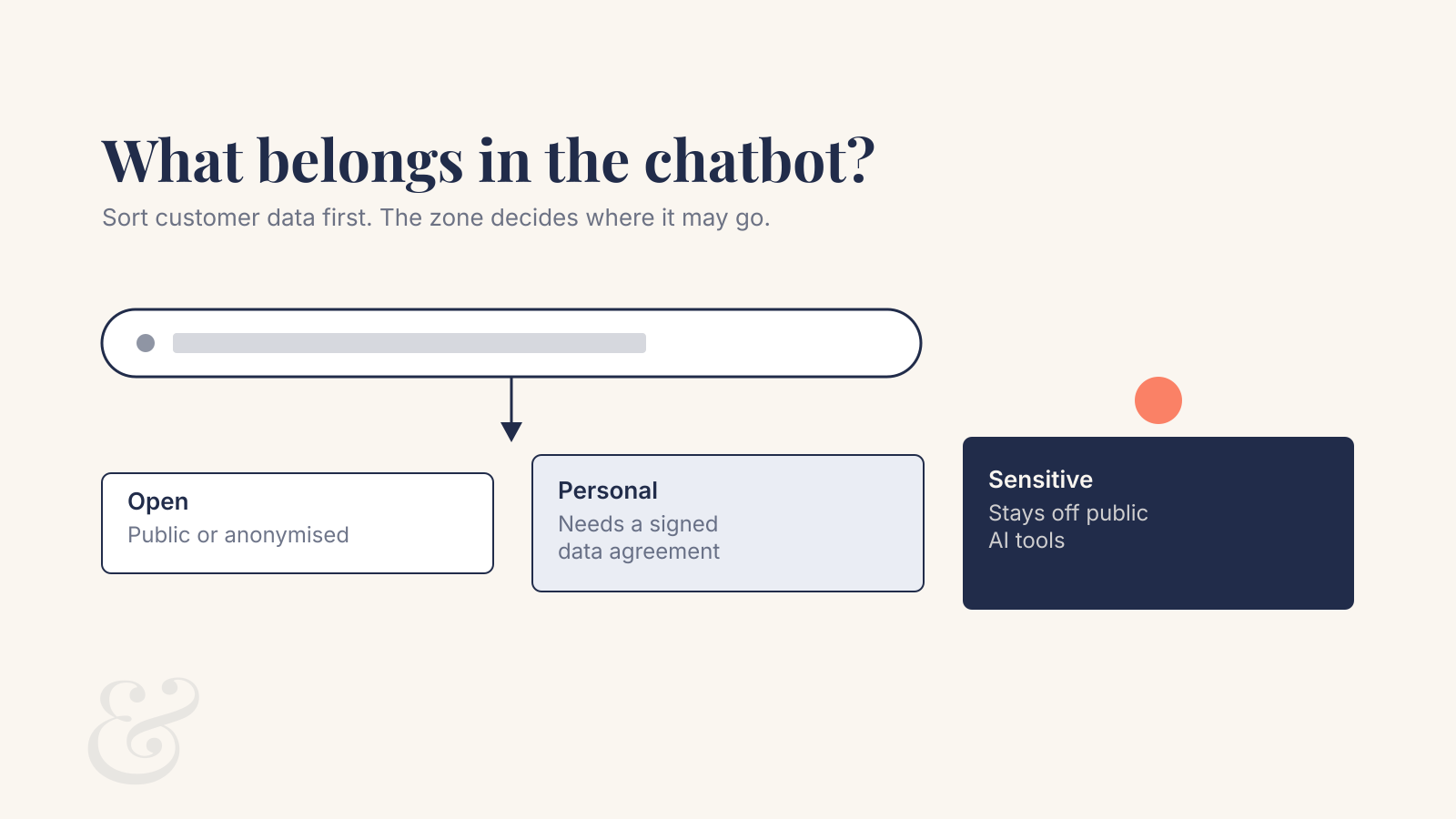
Tool choice comes second. First, decide which of three zones a piece of information belongs to. The zone tells you where it may go.
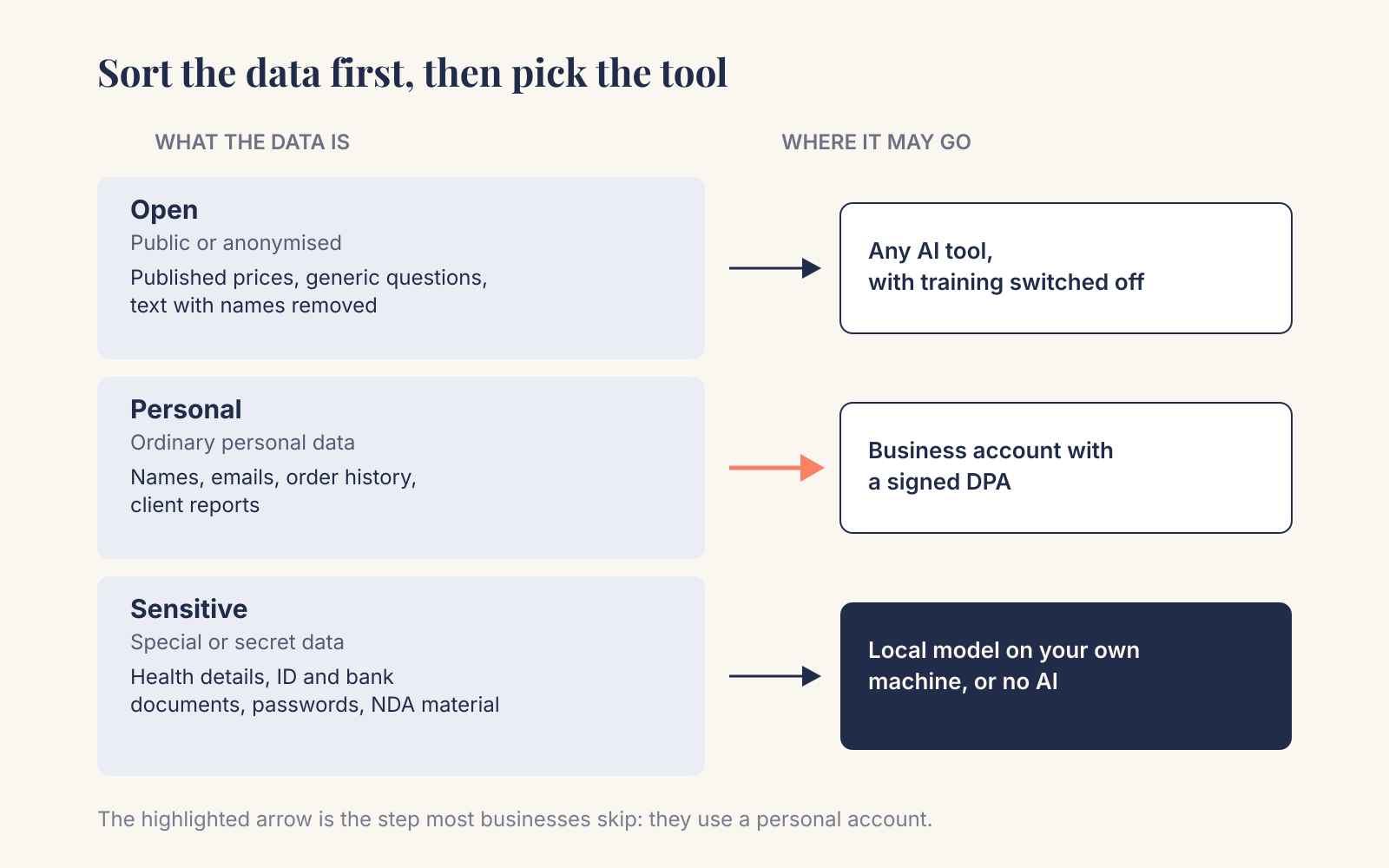
Zone 1: public or anonymised. Published prices, a product description, a newsletter draft without names, a customer email with everything identifying removed. Any reputable tool is fine here, with training switched off as a matter of habit.
Zone 2: ordinary personal data. Names, email addresses, phone numbers, order histories, invoices with a contact person, client reports, meeting notes about a named customer. This needs a business account with a signed DPA, and staff should be logged into that account and no other.
Zone 3: special or secret data. Health information and the other special categories in GDPR Article 9, plus ID documents, citizen service numbers (BSN), bank details, passwords and access keys, and anything you received under an NDA. This stays out of cloud chatbots. Use a local model on your own hardware, or do the task by hand.
What this looks like in a few real kinds of business:
- A physiotherapy practice. Writing a general blog post about knee rehab: Zone 1. Rewriting a reminder email to a named patient: Zone 2. Summarising treatment notes: Zone 3, because that is health data.
- A bookkeeper. Asking how the Dutch small-business VAT scheme works: Zone 1. Drafting a reminder to a client about missing receipts: Zone 2. Pasting a client's bank statements or payslips: Zone 3.
- A webshop. Generating product copy: Zone 1. Answering a complaint with the order history: Zone 2. Anything containing payment card data: Zone 3.
Most everyday time savings sit in Zones 1 and 2. That is good news: the safe setup for those zones is a settings change and a contract. No IT project required.
How to anonymise a prompt so it stays anonymous
The quickest way to move a task from Zone 2 to Zone 1 is to take the personal data out before pasting. For most writing tasks, the model does not need to know who the customer is. It needs to know what happened.
Here is the complaint from the opening, before and after:
Before: "Hi, this is Marieke de Vries from Kanaalweg 12 in Alkmaar. Order 48213 arrived a week late and I'd ordered the lumbar cushion because of my hernia..."
After: "A customer writes that their order arrived a week late. They had ordered a lumbar cushion for a medical back problem and are upset. Write a calm, apologetic reply offering a 15% discount code."
Then you add the name and order details yourself. Four rules make this work:
- Describe the situation; skip the source text. Rewriting a summary in your own words removes far more than deleting names from the original. Free text hides identifiers in places you won't spot: a street, a job title, a reference to "my son at the Jan Ligthart school".
- Use placeholders where you need structure. [CUSTOMER], [DATE]. The model handles them well and you can search-and-replace afterwards (but see rule 4).
- Watch for rare combinations. "The only dentist in Heiloo who also does sedation" identifies a person without a single name in it. If a reader in your town could guess who it is, it is not anonymous.
- Remember the legal line. If you can reverse the placeholders using a list you keep, the GDPR calls that pseudonymised data, which is still personal data. Pseudonymising lowers the risk; it does not move the task into Zone 1. True anonymisation means nobody, including you, can reasonably link the text back to the person.
Also check attachments. A screenshot or PDF carries everything visible on it, and file names often include a customer's name.
When the data is too sensitive: local models, honestly
For Zone 3, a local model is the one option where nothing leaves your machine. I run local models on my own projects, mostly on a 16 GB MacBook Air, and they are genuinely useful. They also have limits that sales pages skip, so here is what I've found in my own testing.
The model already on your computer may be enough for small tasks. For my own assistant, I benchmarked Apple's built-in on-device model against the local model I had kept loaded in memory. Apple's answered in 582 ms on average against 1,433 ms and held no memory in my process. Its context limit is 4,096 tokens, a few pages of text, so I route longer jobs to a larger local model. For rewriting a short paragraph, a built-in model is worth trying before you buy anything.
Bigger tasks need bigger hardware, or patience. On 16 GB of memory, larger models run slowly, and when I tested six local models on a complex review task, none was good enough. Test a local model on your own documents before you rely on it.
"Local" must stay local. This is the trap that matters most for Zone 3. During an audit of my own local assistant, I found a code path where a request could be routed differently from what the user had chosen, without telling anyone. Now it stops with an error and asks for confirmation, and document extraction is pinned to the local model with no cloud fallback. If you buy a "private AI" product, ask the vendor: what happens when the local model fails? If the answer is "it uses the cloud", you need to know when, and be able to switch it off.
I wrote more about checking whether a local model is reliable enough in what it actually takes to trust a local model.
A one-page AI policy for a small team
The AP's advice to organisations is short: agree with employees whether they may use chatbots, and which data they may enter. One page that people actually read does that. This checklist covers it:
- Approved tools, by name and account. For example "Copilot Chat, signed in with your work account (green shield)".
- No personal accounts for work data. Not even with training switched off, because there is no DPA behind it.
- The three zones, with your own examples. Real cases from your business.
- The anonymising habit. Describe the situation, use placeholders, check attachments.
- Zone 3 stays out. Name the specific documents: patient files, payslips, ID scans, client contracts.
- Feedback buttons off. Tell staff not to use thumbs up/down on conversations with customer data, since some providers treat feedback as permission to use the whole conversation for training.
- What to do after a mistake. Who to tell, and how fast. People report mistakes when reporting is easy and blame-free.
- Your privacy statement. If customer data goes to an AI provider, list that provider as a processor. When I audited my own website this autumn, the privacy page was missing several processors.
Then make the approved tool the easiest one to reach: bookmark it, log everyone in, demo it once. Otherwise the personal account in the next tab wins. I've written about that adoption gap separately in why your team ignores the AI tool you paid for.
Someone already pasted customer data: what to do
The AP says that if an employee entered personal data into a chatbot against company agreements, that is a data breach, and notifying the AP and the people affected is mandatory in many cases. Under GDPR Article 33, a notifiable breach must be reported to the regulator without undue delay and, where feasible, within 72 hours of becoming aware of it. So act the same day:
- Find out exactly what went in. Which tool, which account type, what data, how many people.
- Delete the conversation and, for a personal account, switch off training. Note that deletion on the provider's side can take up to 30 days.
- Assess the risk to the people involved. A first name in a scheduling email is low risk. Medical details, ID numbers or financial data are high risk. The AP's website has a guide to whether a breach must be reported.
- Record it, even if you decide not to report. The GDPR requires you to document every breach, including the ones you don't notify.
- Fix the cause. Usually the cause is that the approved tool was harder to reach than the free one. Change that.
If you are unsure whether to report, ask a privacy professional. I can set up the tools and accounts; the reporting decision is a legal one, and I am not a lawyer.
What to do next
Start by finding out which accounts your team actually uses. Ask, and look at the browser bookmarks. Then:
- Check what you already pay for. Microsoft 365 or Google Workspace may already include an AI assistant covered by your existing data processing terms.
- Pick one approved tool and account type and sign its DPA. For OpenAI that means ChatGPT Business or higher; for Mistral, check which plan includes the terms you need.
- Write the one-page policy with your own Zone 1, 2 and 3 examples.
- Teach the anonymising habit with one real example from your own inbox.
- For Zone 3 tasks you want to automate, test a local model on your own documents before relying on it, and confirm it has no silent cloud fallback.
- Update your privacy statement to list every AI provider that receives personal data.
If you want help choosing the setup, configuring a business workspace or testing a local model on your sensitive documents, that is part of my AI consulting work. And when you want to automate a workflow that touches customer data, AI automation starts with exactly this sorting exercise.
FAQ
Is ChatGPT GDPR compliant?
No tool is GDPR compliant on its own; compliance depends on how you use it. OpenAI offers a Data Processing Addendum for ChatGPT Business, ChatGPT Enterprise and its API, and does not use data from those products for training by default. Personal Free, Plus and Pro accounts have no business DPA and are used for training unless you switch that off.
Does switching off "Improve the model for everyone" make a personal account safe for customer data?
It reduces the risk of training on your conversations, but it does not give you a processing agreement, and chats are still stored. For customer data, use a business account with a signed DPA instead.
Can my employees use ChatGPT on their own accounts for work?
They can use it for Zone 1 work: public information and text with all personal data removed. Keep customer data out of them: the AP links most AI-related breach reports it receives to staff using free chatbots instead of the business version their employer pays for.
Do I have to report it if someone pasted customer data into ChatGPT?
Often, yes. The Dutch AP treats it as a data breach when staff do it against company agreements, and notification to the AP and the affected people is mandatory in many cases, where feasible within 72 hours. Record the incident either way.
Want this done for your business?
I set up practical AI, build websites that get found, and design brands that hold together. Fixed prices, written scope, one accountable person.
Fixed prices, excl. VAT · You own everything · Reply within 24 hours